Showing posts with label google. Show all posts

Thursday, September 24, 2015

Google Weblight - using full content from sites on their domain

Like to many 'lite' things, there are serious side effect with this web-light version by Google. 

Some time ago, I think it was April, Google announced they would serve web pages that are too slow for some users scrape off the owner website and serve from their servers. The test was supposed to start in Indonesia and targeted towards 2G connection. Then later, they started rolling this out for 'select countries' and slow mobile connections (2G). 

The 'transcoding' is done on the fly, according to news, and speeds things significantly up, we have seen 10x faster loads.


Weblight - look and feel

This is how it looks like in the original on the left, and the 'scraped'  site on the right. Not bad, really. Users can load the original page in the top section, with a warning that it might be slow. Sounds very user friendly approach to me. The navigation (nav icon in the upper left) is solid, and not missing anything in the top level.  


Biggest flaw is that it removes pretty much all third party elements - including our tracking elements, scripts, etc.. Google claims to leave up to two ads on the page, and allow simple tracking with Google analytics. 


Traffic on weblight

We (Dell.com) actually see some traffic with Googleweblight. It is minuscule, noticed only because we have been specifically looking for it, but there it is. We see some referral traffic in Adobe sitecatalyst, and we also see the 'scraping' of pages in our logfiles. 


Most of the traffic for us seems to be from India, and trying to reach a variety of pages in several countries instead just India, which might explain some of the slowness. 

The scraped or 'transcoded' pages can be found in logs with cs_User_Agent="*googleweblight*", and the pages that get the referrer traffic from the referrer "googleweblight.com". 


How relevant are 2G networks for global ecommerce

So far, it seems super small, but the market potential is quite big. Global data on network coverage is a bit harder to come by, but there are some relevant sources.

Some excerpts from a McKinsey report:
"In developed countries and many developing nations, 2G networks are widely available; in fact, Ericsson estimates that more than 85 percent of the world’s population is covered by a 2G signal.42 Germany, Italy, and Spain boast 2G networks that reach 100 percent of the population, while the United States, Sri Lanka, Egypt, Turkey, Thailand, and Bangladesh have each attained 2G coverage for more than 98 percent of the population.43 Some developing markets don’t fare as well: as of 2012, 2G network coverage extended to 90 percent of the population of India, 55 percent of Ethiopia, 80 percent of Tanzania, and just under 60 percent of Colombia.44 Growing demand and accelerated rates of smartphone adoption in many markets have spurred mobile network operators to invest in 3G networks.
Ericsson estimates that 60 percent of the world population now lives within coverage of a 3G network. The level of 3G infrastructure by country reveals a stark contrast between countries with robust 3G networks and extensive coverage, such as the United States (95 percent), Western European nations (ranging from 88 to 98 percent), and Vietnam (94 percent), and many developing markets such as India, which are still in the early stages of deploying 3G networks."
(highlights by me)


The graph from the same publication shows significant 2G/3G only coverage even for the US.
Slightly more optimistic statistics from the ICT figures report for 2015  - look at US penetration rate for example, or Norway. A map and discussion with US internet speeds on Gizmodo. 


How to see your site on Google weblight

For this blog, it is: googleweblight.com/?lite_url=https://andreas-wpv.blogspot.com . Don't forget to use some kind of mobile emulator, to see how it really looks like! Only some resolutions are supported - one is the standard Iphone 4 with 320 x 480. 

Google original:


Is this legal? How about copyright?

Honestly - I don't want to go there, I am no lawyer, and there are some complex questions arising - internally. 
Google claims that companies win so much traffic, it is really in their best interest. For every site that does not want this treatment, there is a way to opt out described on the Google help pages, and it gives some insight into what's removed.  Some more tech details on this article: mostly compression, removal of third party elements, reduction of design elements. 

Google names this 'transcoding' - to me it looks like scraping and serving from their website, something that might be considered a copyright violation, and would likely be against Google 'terms of service' (highlights by me):
"Do not misuse our Services, for example, do not interfere with our Services or try to access them using a method other than the interface and the instructions that we provide. You may use our Services only as permitted by law, including applicable export and control laws and regulations. We may suspend or stop providing our Services to you if you do not comply with our terms or policies or if we are investigating suspected misconduct."

Additionally - would not adwords on a weblight page violate Adwords terms of service?
" Content that is replicated from another source without adding value in the form of original content or additional functionality


  • Examples: Mirroring, framing, or scraping content from another source"

  • I would understand - perhaps misunderstand - this the way that Google Adwords cannot be used on weblight pages.

    More general, is this scraping ok for Google to do?

    Sept. 25, 2015: It seems from some glance in the detailed data transfer (chrome, fiddler), that it is more of a filtering of content with some kind of proxy. Working on it.

    Resources:

    Additionally to the above links, there are a few articles I found on this topic + Google sources:

    http://gadgets.ndtv.com/internet/news/google-india-to-offer-faster-access-to-mobile-webpages-for-android-users-702302
    http://www.unrevealtech.com/2015/07/how-to-prevent-site-loading-google-weblight.html
    http://www.androidauthority.com/google-web-light-looks-616450/
    http://digitalperiod.com/google-web-light/
    https://support.google.com/webmasters/answer/6211428?hl=en

    Wednesday, July 29, 2015

    Google: "making the web faster"

    ... how about starting at home?

    I have chrome open with two tabs (gmail and G+) and three plugins (seoclarity, everyone social and WooRank), and you need HOW many processes and HOW much memory?

    I have 20 plugins I'd like to use, and 10+ tabs I'd like to keep open, but that just won't work with this wasteful resource usage.


    Tuesday, May 26, 2015

    Google mobile friendly: Industries, site types and self centered algorithm change

    Maybe it is just me.

    Since Google was promoting everyone to make their sites mobile friendly, many pages are a pain to read now on a regular laptop or monitor.

    Example SEO Blog: moz.com/blog

    Take the moz blog, for example. Great on mobile, not good to read on a desktop. HUGE image up front, pushing all content below the fold. That's just not good, not for SEO, and not for usability.

    Desktop design due to Google push? Image is all I see on the screenshot 14" full laptop screen.

    Example News blog: Search Engine Land

    Similar issue. I do NOT like headlines that big, really.
    Desktop design due to Google push? On my screenshot 14" full laptop screen I see a lot of headline, and... Ads.


    Now, lets look at a few more.

    Amazon has a different url concept (in parts, at least). Mobile experience is not that great, and if I hit the back button, I get the desktop homepage on phone screen, I had hoped for something different.


    Bestbuy is not really different - showing off their headline :-). The responsive seems not optimized, at least not for me.


    Dell? We have some great pages, some ok pages (many on separate url on m.dell.com) and some definitely having room for  improvement when it comes to mobile / responsive - and we have lots of teams working on improving that, both some different url country setups, and some responsive ( http://www.dell.com/en-us/work/learn/large-enterprise-solutions for example). But responsive lends itself to some content like consulting service description, and not to other content like picking a laptop out of a larger selection.

    Many sites need to serve content to mobile users much better than they currently do, and Google's push is a good reminder. I do think they have gone a bit far, and I am not sure they are aware that other industries have different needs. Google has an easy play. Their content and searching lends itself to responsive design but it is not really fair to compare search and search results to news, magazines and eCommerce sites. They all have much more complex processes users need to go through, and they have other business models than exploitation of personal data.

    Does not Google's data actually confirm that there are industries where mobile is really important and some where it is not? Showing data from Google adwords tool, just random terms used to see some variance:


    Not really a big surprise when you think about it. And even the keyword 'search' has 51% of searchers using a pc / monitor, not a phone or tablet, according to Adwords data. I understand the search algorithm change was not large, but it all of the above indicates, it should really not be more either. Many industries don't have that much mobile share, and responsive does not work well for complex tasks. It can be made to work well with adaptive and even better separate urls, layout, but that is slow, complex and expensive, so it takes even more mobile share to justify the investment.

    But maybe I am totally wrong because I just have not seen the great examples out there. Do you have an example of a site with complex task that really works well on phone + monitor in a responsive layout?

    Thursday, April 23, 2015

    8 User agents and responses Alexa top million pages

    Some more interesting results from the test run with 8 different user agents and the return size of the documents from the top 1000 sites in the Alexa 1million.

    These are the largest returns - interesting to see these sites here, newspapers, stores, portals.


    Many of the smallest sites are returning nothing, redirecting or under construction, actually quite a lot of the top performing pages.


    But... maybe that's just because of the unknown user agent? (or the one with wget in it?)

    Yes, very different picture. With just the regular user agents, just few page don't send a page back. Some redirect, but some are just very, very small, great job!

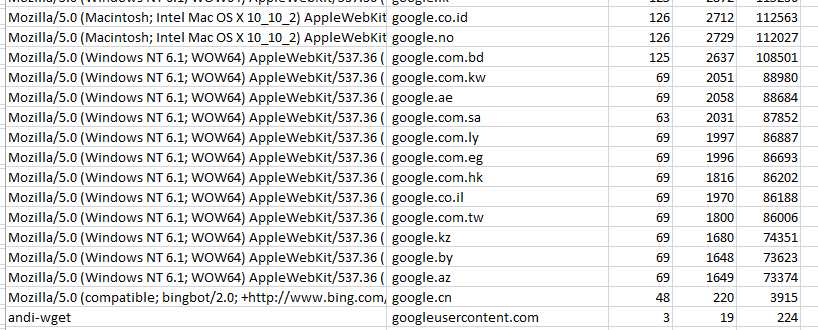
    See Baidu in there? Now let's take another look at a few search giants. Google is amazing - that looks like the exact same page with a few lines in various languages. Interesting to see how much code each line contains though, that's huge compared to other sites.


    And while the search giants likely have all kinds of fancy (tracking?) elements, some of the search alternatives have a few more lines, but much less actual code on the page. 


    Filtering a bit further the confirmation no one likes my 'andi-wget' user agent. Means, future work with wget will need to have a different user agent nearly always!


    Check out the first post with result on average responses sizes and how Google responds.

    Tuesday, April 7, 2015

    Including Google: 8 agents - and average response code


    Agents, not spies

    Agents, user agents, play an important role in the setup and running of sites, likely more than many developers like. Exceptions, adjustments, fixes - and it is (?) impossible to generate code that shows up properly on all user agents and also is W3C compliant. 

    So, sites care, and likely Google cares as well. Google - like any site - offers only one interface to their information (search): source code. How the page looks like, how it is rendered, the tool that renders it is not Google, not provides or supported or maintained or owned by Google, but something on client side. Not even the transport is provided by Google. Google only provides a stream of data via http , https, and anything after that is not their business. 

    So, my question was - do user-agents make a difference? 

    And sure, what better to use than a little script? There are so many different user agents, I wanted to keep this open to changes, so I loop over a file with user agents - one per line - as well over a list of urls to get the response from these sites.

    Surprising results: Bingbot and Googlebot receive the smallest files - not wget or a unknown bot. The graph overstates this, but the table shows there's a clear difference. 


    Google.com answering

    Now let's take a look at the response Google.com sent back to the little script. They do NOT like wget or andi-bot, nor google bot or bingbot, although they perform a bit better than the first two.
    High focus on the regular user agents. The picture for words is the same as for lines.

    Google only provides a datastream, rendering is on client side. So if I use firefox, IE, safari, wget or curl is my business - and not Google's.  I understand that google does not want people to scrape large amounts of data off their site - which i don't do - but I am surprised the 'block' is not a bit more sophisticated.


    Monday, February 16, 2015

    Google Sitespeed Score and Rank

    While Matt Cutts mentioned that site speed only affects a small percentage of sites in their rankings - running one of the largest sites this is worth a second look. Due to the millions of pages, speed might be especially critical for rank - or at least for indexation.

    Sitespeed is not sitespeed score, but a relatively 'neutral' way to measure speed related performance.

    What to do? First, I selected pages across site, some 2500 pages to have a nice sample. Then I pulled the average rank for each of these pages from seoclarity(.net). And combined this with the speedscore from my script. 
    As a last step imported this table into Excel and ... scatterplot! Vertical is the ranking position, and x-axis is the speedscore. At first sight, this would indicate that with increasing speed score pages rank worse, but overall I would say this means there is no correlation at all (0.09),  and the variance is way too big to use this to calculate a trend. 


    Thursday, January 22, 2015

    Alexa 1 million Top mobile performers on Google sitespeed score: perfect score 100


    Mobile SpeedScore

    Similar to the desktop numbers here are the top performers on mobile with a speedscore of 100 (out of the top 10,000 from Alexa's top million sites!
    Checked with this script, and then just a graph in Excel to show the distribution of 100-score by 1000s. While there seems to be a strong correlation between being in the top 1000 and sitespeed, sites with a speedscore of 100 appear more frequent in other areas, highest in the sites which rank in the 8000s in Alexa.


    Sitelist mobile Speed Score

    No Google search, interestingly, and many other big names missing, but a list of urls I am not even going to try to check the content through our company network. Bold shows sites, that have a speedscore of 100 in desktop and mobile:

    position in Alexa top 10,000 site url speedscore
    29 googleusercontent.com 100
    122 secureserver.net 100
    571 github.io 100
    776 streamcloud.eu 100
    1051 gstatic.com 100
    1197 atpanel.com 100
    1497 sourtimes.org 100
    1537 openadserving.com 100
    1576 googleadservices.com 100
    1636 googleapis.com 100
    1969 securepaynet.net 100
    2153 anitube.se 100
    2281 nocookie.net 100
    2616 socialspark.com 100
    2665 bookryanair.com 100
    2696 onlinecreditcenter6.com 100
    2729 gudvin.tv 100
    2896 giaoduc.net.vn 100
    2935 sexad.net 100
    2981 9gag.tv 100
    3179 withgoogle.com 100
    3343 readserver.net 100
    3455 ecplaza.net 100
    3491 dilandau.eu 100
    3606 prcm.jp 100
    3659 themeko.org 100
    3802 puu.sh 100
    4047 get-a-fuck-tonight.com 100
    4181 kienthuc.net.vn 100
    4194 stream-tv.me 100
    4340 api.ning.com 100
    4355 benesse.ne.jp 100
    4571 itrack.it 100
    4606 trackoptimizer.com 100
    4743 7xz3.com 100
    4965 uast.ac.ir 100
    4982 edgesuite.net 100
    5013 liveadexchanger.com 100
    5318 ipsosinteractive.com 100
    5349 fun698.com 100
    5433 moudamepo.com 100
    6304 reduxmediia.com 100
    6605 teknosa.com.tr 100
    6711 tradetang.com 100
    6714 vgsgaming.com 100
    6804 yieldtraffic.com 100
    6808 insight.ly 100
    7009 contest-winners.com 100
    7070 exhentai.org 100
    7116 techhelpfox.com 100
    7285 mlstatic.com 100
    7736 mmstat.com 100
    7772 lovethatsex.com 100
    8038 endlessmatches.com 100
    8040 savedwebhistory.org 100
    8160 flirt-fuck.com 100
    8213 h12-media.net 100
    8298 kataskopoi.com 100
    8414 ihct.mx 100
    8601 evsuite.com 100
    8630 rapmls.com 100
    8735 9stock.com 100
    8921 credomatic.com 100
    8991 fullsail.edu 100
    9097 youtu.be 100
    9236 cncmax.cn 100
    9335 gefaellt-mir.me 100
    9345 vtb24.ru 100
    9348 xe2c.com 100
    9360 tehran.ir 100
    9745 jobspapa.com 100
    9792 iphone-winners.net 100
    9898 nolix.ru 100
    9907 mihanstore.net 100

    Tuesday, December 30, 2014

    Logfile analysis for SEO: visualization of bot visits

    The bot visits are filtered out of logfiles and sorted / counted as shown here. This here now filters for certain bots (out of the hundreds visiting the site) and makes a small graph out of it.

    This is the resulting table - easy to adjust to the bots of interest based on earlier research. (These are not real numbers, but just fillers to show how it looks like). 


    This is the visualization in excel of the table with real numbers. Yandex is not in here, because they had so many visits that they dwarfed all the other bots counters. Each color stands for a different bot.


    This is the filter to get the table - which can be easily adapted to show more / less or different search engine crawler data:
    echo -e 'google\tbing\tyandex\tbaidu\tapple\tlinux\ttrident' > bots-table.txt
    for i in $(ls | grep "[[:digit:]]-[[:digit:]]"); do
    google=$( cat $i/bots-traffic.txt | awk 'BEGIN { FS = " " } $13~/oogle/ { print $ 13 } ' | wc -l ) ;
    bing=$( cat $i/bots-traffic.txt | awk 'BEGIN { FS = " " } $13~/bing/ { print $ 13 } ' | wc -l ) ;
    yandex=$(cat $i/bots-traffic.txt | awk 'BEGIN { FS = " " } $13~/yandex/ { print $ 13 } ' | wc -l ) ;
    baidu=$(cat $i/bots-traffic.txt | awk 'BEGIN { FS = " " } $13~/baidu/ { print $ 13 } ' | wc -l ) ;
    apple=$(cat $i/bots-traffic.txt | awk 'BEGIN { FS = " " } $13~/Apple/ { print $ 13 } ' | wc -l ) ;
    linux=$( cat $i/bots-traffic.txt | awk 'BEGIN { FS = " " } $13~/Linux/ { print $ 13 } ' | wc -l ) ;
    trident=$(cat $i/bots-traffic.txt | awk 'BEGIN { FS = " " } $13~/Trident/ { print $ 13 } ' | wc -l ) ;
    echo -e "$i\t$google\t$bing\t$yandex\t$baidu\t$apple\t$linux\t$trident" >> bots-table.txt
    done

    Old version - with 'wrong' results, needed to show date from folder to make sure they are aligned

    echo -e 'google\tbing\tyandex\tbaidu\tapple\tlinux\ttrident' > bots-table.txt
    google=$(for i in $(ls | grep "[[:digit:]]-[[:digit:]]"); do cat $i/bots-traffic.txt | awk 'BEGIN { FS = " " } $13~/oogle/ { print $ 13 } ' | wc -l ; done)
    bing=$(for i in $(ls | grep "[[:digit:]]-[[:digit:]]"); do cat $i/bots-traffic.txt | awk 'BEGIN { FS = " " } $13~/bing/ { print $ 13 } ' | wc -l ; done)
    yandex=$(for i in $(ls | grep "[[:digit:]]-[[:digit:]]"); do cat $i/bots-traffic.txt | awk 'BEGIN { FS = " " } $13~/yandex/ { print $ 13 } ' | wc -l ; done)
    baidu=$(for i in $(ls | grep "[[:digit:]]-[[:digit:]]"); do cat $i/bots-traffic.txt | awk 'BEGIN { FS = " " } $13~/baidu/ { print $ 13 } ' | wc -l ; done)
    apple=$(for i in $(ls | grep "[[:digit:]]-[[:digit:]]"); do cat $i/bots-traffic.txt | awk 'BEGIN { FS = " " } $13~/Apple/ { print $ 13 } ' | wc -l ; done)
    linux=$(for i in $(ls | grep "[[:digit:]]-[[:digit:]]"); do cat $i/bots-traffic.txt | awk 'BEGIN { FS = " " } $13~/Linux/ { print $ 13 } ' | wc -l ; done)
    trident=$(for i in $(ls | grep "[[:digit:]]-[[:digit:]]"); do cat $i/bots-traffic.txt | awk 'BEGIN { FS = " " } $13~/Trident/ { print $ 13 } ' | wc -l ; done)
    paste <(echo "$google") <(echo "$bing") <( echo "$yandex") <(echo "$baidu")  <(echo "$apple")  <(echo "$linux") <(echo "$trident") >> bots-table.txt


    Thursday, December 18, 2014

    Google sitespeed score - script to tap api and Alexa top 10,000


    Pagespeed - Score

    Even if it would not be relevant for large site indexation, it still has huge impact on traffic, bounce rate and CE. Google offers a great tool to get their feedback - the sitespeed score. It does not show the actual speed, but how your page is build compared to an page ideally built for speed. So it shows the potential to improve.

    As input I use the top 10,000 from the Alexa top million pages - using the homepage, only. (I actually split it in 10, ran the script 10x in parallel). The process is relatively slow, as Google checks the pages, and give much more details back than just the score - which I filter out, below. Just fill in your api key (after the = sign) and feed your sitemap (just urls) to the script. Below is for mobile sitespeed, for desktop just swap mobile with desktop. The allowance currently is 25 k api calls a day for free, that's plenty for most sites or projects.

    Mobile sitespeed score scatterplot of Alexa top 10,000 sites homepages

    Then I just cleaned it out, set all garbage values to zero, and build a scatterplot.
    • Few sites at 100 sitespeed score
    • a relatively sparsely populated area between 80 and 100 
    • the bulk of sites between 40 and 80
    • scores 40 and lower being less frequent as well.


    Speedtest score script:

    And this is the script:
    filename=mobile-speedtest-$RANDOM.txt
    echo -e 'url\tspeed-score' > ${filename}
    IFS="," ; while read -r counter line; do
    score=$(curl -s  -m 30 -f --retry 1 --proto =https --proto-redir =https "https://www.googleapis.com/pagespeedonline/v1/runPagespeed?url=http://www.${line}&strategy=mobile&key=--- your api key ---" | sed -n '/score[^,]*,/p'| sed -e 's/\"//g' -e 's/,//g' -e 's/score: //g' )
    echo -e "$counter \t $line \t $score" >> ${filename}
    done < $1

    Monday, September 29, 2014

    Same domain, completely different sites - how come?

    KFMA - is a radio station here in Austin. As I just listened to some music, and wanted to learn what it was, I tried to access their site.

    1. kfma.org in chrome - result is a redirect to this, same result for www.kfma.org:


    So far, so good - or not, because that does not look like the radio station.


    Thinking my memory might have tricked me, I google and see this, with big surprise, because that's what I typed and got the Korean site. How come?


    I click through, and get this result - the site I wanted to see.

    Funny, though, that's the url that I used earlier, which forwarded me to the other site, but this time, coming from Google it works.

    How is that possible? Wrong entry in some DNS? And why is Google sending me to the 'right' site, and not to the Korean? Do they actually use IP addresses rather than domains?


    Wednesday, July 30, 2014

    Send money per Gmail

    Most interesting feature -  I know quite a few companies have been working on this, and read a bit about Google planning financial services, but it still came as a surprise when this popped up in my gmail today:


    Google offers to send money per email to any recipient it looks like.
    And the transfer seems to be free with a debit card of when linked to an bank account. 
    It again provides verification - real world verification, much stronger even than a phone number! And it also will make it easier to purchase through Google - giving Google fees in the process. 


    Thursday, July 10, 2014

    Google ngrams - see the rapid increase for Google


    Ngrams has data on word occurrences in books over a long timespan (1800 to 2008). A 1gram is just the word itself, a 2gram a two word combination and so on.

    What's closer than trying this on mentions on search engines in books? They pretty much show the rapid rise of mentions of  'Google' compared to others like Bing, Baidu, Hotbot, Altavista, Wolfram Alpha (with the last two not even being found).

    Take a look:


    Definitely going to use this more!

    Thursday, June 5, 2014

    Content ownership - is Google using 3rd party site content for Ad revenue on their search results page?

    Look at this:


    Google shows content taken from another  website (mentioned in a miniature link below the content).

    Would you click through or not?

    These are the current results:

    With this content taken from the 3rd party site shown on Google - is there still a need to go to the other site? How much is this going to affect the traffic on the other website? Is Google is monetizing other sites' content with their ads on the search results pages?

    The site is tagged nicely, having the right descriptors in place.


    I tested the site in Google's markup tester, and the markup for recipe and author works (Download).
    The tool also shows a very different picture as a preview - misleading, in case an author tries to see what others are likely to see in Google.


    Many sites rely on ad revenue to finance their operations and content - this will become impossible if above becomes more common. With this revenue taken off the other sites it seems as if Google is cutting off the branch on which they are sitting. And it very much seems like copyright infringement to me (but I am no lawyer and might be wrong).

    the search - the result screen (top) is from June 1, 2014

    Thursday, May 15, 2014

    Scraper for video pages to get all data for video sitemap

    This scraper is based mainly on opengraph tags (which are used by Facebook, for example), so it should work well with many pages, not just Dell.com pages. More info on sitemaps at Google .

    #! bash
    #check if its called with a filename - a file containing urls for pages with videos
    if [[ ! $1 ]] ; then
    echo "need to call with filename"
    exit 1
    else
     #now make sure to have a unique filename, based on the file with the urls
    filename=$(basename $1)
    name=${filename%.*}-$RANDOM-
    #header info for the file with the results. Need to pull page url, video title, thumbnail url, description.
    echo -e 'url\tpage\tTitle\tThumb\tDescription' > ${name}video-sitemap-data.txt
    #loop through the file and store in a variable
    while read -r line; do
    filecontent=$(wget -qO- "$line")
    # echo results and clean up with sed, tr and grep, then append to the file that has the column headers already. It has 4 elements - and each is isolated in its own part. The parts are connected with &&, and everything in ( and ) - otherwise it only echos the last part into the file.
    (echo "$line" | sed 's/\r$/\t/' | tr '\n' '\t'  && echo "$filecontent" | grep "og:video" | grep "swf" | sed -e "s/^.*content=\"//" -e "s/\".*$//" | sed 's/\r$/\t/' | tr '\n' '\t' && echo "$filecontent" | grep "og:title" | sed -e "s/^.*content=\"//" -e "s/\".*$//" | sed 's/\r$/\t/' | tr '\n' '\t' && echo "$filecontent" | grep "og:image" | sed -e "s/^.*content=\"//" -e "s/\".*$//" | sed 's/\r$/\t/' | tr '\n' '\t' && echo "$filecontent" | grep "og:description" | sed -e "s/^.*content=\"//" -e "s/\".*$//") >> ${name}video-sitemap-data.txt
    done < "$1"
    fi
    I'd be delighted to know this helped someone else - why don't you drop me a note when you do?

    This is one of the pages that I used for testing, just in case someone wants to test this:
    http://video.dell.com/details.php?oid=RraTJsZDrsDKFAjNcj2WmTovA1ovugc-&c=us&l=en&s=bsd&p=learn .

    Thursday, May 1, 2014

    New Google Schema implementation for Phone Numbers - little helper for lots of phone numbers

    Google is showing phone numbers now for company searches

    Nope, not happy about the fact that Google is showing phone numbers for company searches - but not for phone searches. How much sense does that make?

    I prefer online, usually, and call only as a last resort. Calls take much longer, sometimes it is hard to hear or understand what the other's say. And sometimes I find it incredibly aggravating to be on a call for hours to fix something that the company I am calling "broke" in the first place - or did not prevent. (Although I know there are many companies involved, in producing one product). And I also know, most companies (including the one I work for)  really try hard to give good online and phone support.

    And now Google is showing support phone numbers for companies - no matter if it is an online only company.  And they show them as part of the knowledge graph - but NOT when someone searches for a phone number. How smart is that.

    And they are currently  not showing for Chrome books or for google - how fair is that?

    The schema documentation works just fine, watch for this:
    • the visible number on the page needs to be the same as the one in the json / schema part
    • for multiple contact points for the same organization, that part of the code can be iterated, comma separated
    • phone numbers for several countries can be integrated on one page. 

    Script for many phone numbers:

    Ok, so I had to update ~ 80 country phone numbers, and got just one not very good list of phone numbers, including international calling code. First I started concatenating in my beloved MSFT Excel, but that's no fun, especially since quotes need to be escaped (doubled), so I ended up with a lot of double quotes - which I then had to remove in a later step. But this needed to be done quickly, once I had the final list, which made me do this little script.

    This script loops through the list of phone numbers with awk, writes the two parameters into variables, and fills the info in the schema snippet. As a result, the script generates one schema.org snippet for each country and phone number.

    Three files needed, the script (shown at the end) a list of phone numbers and the schema for this kind of phone numbers.

    This is the schema info we were going to use, where I used two placeholders - changeNumber and changeArea:
    The list of phone numbers looks like this, and is tab delimited:


    And now the script:
    awk '{print $1, $2}' tab-phone-numbers | while read input2 input1
    do
    awk -v var1="${input1}" '{ sub("changearea",var1)} {print $0}' phone-code-snippet |  awk -v var2="${input2}" '{sub("changenumber",var2);print$0}'>> phone-results
    done 
    What really helped me do this was the trick to use read to get the output into variables (bold). Found this first here (thanks duckeggs01) and confirmed on my trusted source for man pages online - ss64 . I am sure I'll use this more, very quick and easy, efficient.
    First part is a loop with awk through the numbers assigning each field value to a variable. Then nested two awk commands - assigning the external variable to an internal. Then, replacing the first variable the first placeholder, piped into a second awk with the second variable replacing the second placeholder, ... done.

    In this first run this script produced one complete snippet per country - good if you need the snippets on several pages. For usage on one page, the template for the schema needs to be changed to only include the contact point info, then run, and add header / footer afterwards to the whole section.

    Thursday, April 3, 2014

    Pull data for video sitemap

    Video sitemaps are sometimes helpful to make Search engines aware of videos on a site. We use several systems to generate pages with videos, and as a result it is not easy to get information from the back-end to generate sitemaps. So - like Google - we have to take it from the front end as much as possible. This script with details is likely limited to just Dell.com, and even here I have found that videos in some sections are not able to be indexed by this. Still, this has been extremely helpful to find the 'hidden' details on our video implementations. (And yes, we have requirements to change these in the process since a while :-) ).

    Elements necessary for a sitemap are:
    1. Pageurl
    2. Title
    3. Keywords
    4. Description
    5. Video URL
    6. Thumbnail url
    And this scripts pulls it nicely of many of our video pages. (We use open graph tags, which makes it relatively easy to pull most info). The script needs to be called with the filename of the text list of urls as first parameter ( . script.sh listofpages.txt)
    if [[ ! $1 ]] ; then
    echo "need to call with filename"
    exit 1
    fi
    file=$RANDOM-sitemap-data.txt
    echo $file
    echo -e "url\tTitle\tthumbnail\tdescription" > $file
    while read -r line; do
    filecontent=$(wget -qO- "$line")
    wait
    (echo "$line" | sed 's/\r$/\t/' | tr '\n' '\t'  && echo "$filecontent" | grep "og:video" | grep "swf" | sed -e "s/^.*content=\"//" -e "s/\".*$//" | sed 's/\r$/\t/' | tr '\n' '\t'  && echo "$filecontent" | grep "og:title" | sed -e "s/^.*content=\"//" -e "s/\".*$//" | sed 's/\r$/\t/' | tr '\n' '\t' && echo "$filecontent" | grep "og:image" | sed -e "s/^.*content=\"//" -e "s/\".*$//" | sed 's/\r$/\t/' | tr '\n' '\t' && echo "$filecontent" | grep "og:description" | sed -e "s/^.*content=\"//" -e "s/\".*$//" )  >> $file
    done < "$1"
    cat -A "$file"


    As always - I use this, and would love to hear tips to improve or see other scripts for site optimization and maintenance.


    Tuesday, January 21, 2014

    Public shares on Google Plus: Moz.com with impressive strategy

    What an excellent strategy to run a community with top level specialist on your main domain!

    While we all should know that this kind of guest blog is highly valuable, I did not expect the extent of impact. Guests write their posts and under certain settings they are 'promoted' to the front page of the blog. Moz offers us a tool to take a closer look - a sitemap of blogposts (moz.com/blog-sitemap.xml).

    Just to get an idea how relevant this is, I used my ripple script to check how many ripples each of these posts has accumulated. (Ripples being public shares on Google Plus). This has the usual limitations, it is just like a screenshot at a certain moment and angle.

    Total shares of the urls in the sitemap: 26,584. Wow!
    Even the Google homepage currently has only 8283 ripples. The highest ranking posts are "Google plus correlations" with 980 ripples, and "ranking factors 2013" with 633 ripples.

    That's a LOT of social links and activity to add to a domain!

    moz blog ripples

    Google Home ripples

    Thursday, March 11, 2010

    Google Maps, Mobile and Real Estate

    One of the more obvious ways to use Google Maps on mobile or on a pc: Scan real estate databases, connect it with streetview, maps, photos, videos and you can add huge value for users.

    Properties
    Now Google just needs to add a way to select categories and properties for real estate. Show real estate, give a distance to a given point (your job location), add a price range and minimum room requirements as filters. Then take a look on a Google map what qualifies for this selection. Check how it looks like. See the surrounding areas. Check out traffic to your job. See if there are bike-ways. Search for restaurants and parks, shopping areas and whatever you like. All on one map.

    Mobile Tracking
    And if you allow Google to track your location while driving (Google latitude, works already) they can alert you when you are moving around town with your cellphone. You might hear a beep because you will pass a house that fits your criteria in a moment.

    This has huge potential and combined with some free, seller / interest based real estate database instead of agents databases will be a huge threat to real estate agents and brokers.


    Monday, February 1, 2010

    Bookmarks and Google Docs

    Wow. I am using Google bookmarks with the new Chrome since two days and Google Docs since quite some time. Today I found a new folder - which I did not build intentionally - with a little chrome icon beside of it in my folder list. How outrageous. No, wait.... how awesome. Google stores the bookmarks in this folder, and all bookmark folder are repeated online. This is awesome and gives me wonderful control over my bookmarks.

    This is the right direction, although I think xmarks is still the better solution because it can be used on all platforms (Windows, Linux, Safari) with most browsers AND with different profiles per browser. Verrrrry helpful to coordinate work across project assignments and even teams.


    Thursday, January 28, 2010

    Google Quality

    May be I should have named this post ...'the slow demise of the internet avantgarde giant'.


    Time outs with mails, glitches with the webmail frontend, we all know that Google is not immune to things we are used to see with other companies. Still, they are one of the best, most reliable and forward thinking companies still.

    I just saw this small glitch and think it is funny. I opened a pdf which was attached to one email - and I got the warning that "The site's security certificate is not trusted". Google mail attachment does not trust mail.google.com, and I get this truly wonderful warning. I always love to see this warning, even if out of other reasons than this time.

    Bookmark and Share