Showing posts with label user agent. Show all posts

Wednesday, June 24, 2015

the script: 8 different user agents and how sites deal with it

User agent analysis script

And mentioned in the earlier post - a script helped me to grab the info on this post on how sites and google specifically treat various browsers.

While there's a lot more to analyse, much of it manually, I wanted to first see if there is an indication of differences - so for first insight I use just a plain wc -l to get characters, words, lines of the response, and it looks like there is a clear pattern. 

So, let's take a look at the source, two nested "read " loops. The outer loop through the urls, the inner loop through the agents:

#check if the file exists
if [[ ! -e $1 ]]; then
 echo -e "there's no file with this name"
fi
outfile=$RANDOM-agentdiff.txt
echo -e "agent \t url \t  bytes \t words \t lines" > $outfile
# add a http to urls that don't have it
while read -r line; do

if [[ $line == http://* ]]; then
newline="$line" else
newline="http://$line"
#  loop through agents. then read output into variables with read "here" <<<
          while read -r agent; do
               read filelines words chars <<< $(wget -O- -t 1 -T 3 --user-agent "$agent" "$newline"  2>&1| wc)
         echo -e "$agent \t $line \t $filelines \t $words \t $chars" >> $outfile
done < $2
fi
done < $1
wc -l $outfile
Most difficult part was to get the wc output into separate variables, thanks stackexchange for the tip with the <<< here string. 

Thursday, April 23, 2015

8 User agents and responses Alexa top million pages

Some more interesting results from the test run with 8 different user agents and the return size of the documents from the top 1000 sites in the Alexa 1million.

These are the largest returns - interesting to see these sites here, newspapers, stores, portals.


Many of the smallest sites are returning nothing, redirecting or under construction, actually quite a lot of the top performing pages.


But... maybe that's just because of the unknown user agent? (or the one with wget in it?)

Yes, very different picture. With just the regular user agents, just few page don't send a page back. Some redirect, but some are just very, very small, great job!

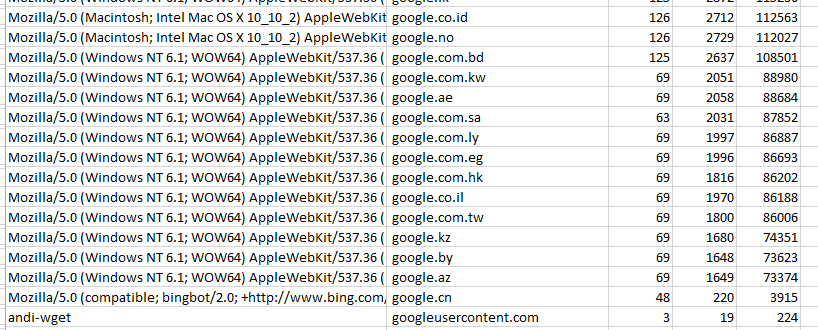
See Baidu in there? Now let's take another look at a few search giants. Google is amazing - that looks like the exact same page with a few lines in various languages. Interesting to see how much code each line contains though, that's huge compared to other sites.


And while the search giants likely have all kinds of fancy (tracking?) elements, some of the search alternatives have a few more lines, but much less actual code on the page. 


Filtering a bit further the confirmation no one likes my 'andi-wget' user agent. Means, future work with wget will need to have a different user agent nearly always!


Check out the first post with result on average responses sizes and how Google responds.

Tuesday, April 7, 2015

Including Google: 8 agents - and average response code


Agents, not spies

Agents, user agents, play an important role in the setup and running of sites, likely more than many developers like. Exceptions, adjustments, fixes - and it is (?) impossible to generate code that shows up properly on all user agents and also is W3C compliant. 

So, sites care, and likely Google cares as well. Google - like any site - offers only one interface to their information (search): source code. How the page looks like, how it is rendered, the tool that renders it is not Google, not provides or supported or maintained or owned by Google, but something on client side. Not even the transport is provided by Google. Google only provides a stream of data via http , https, and anything after that is not their business. 

So, my question was - do user-agents make a difference? 

And sure, what better to use than a little script? There are so many different user agents, I wanted to keep this open to changes, so I loop over a file with user agents - one per line - as well over a list of urls to get the response from these sites.

Surprising results: Bingbot and Googlebot receive the smallest files - not wget or a unknown bot. The graph overstates this, but the table shows there's a clear difference. 


Google.com answering

Now let's take a look at the response Google.com sent back to the little script. They do NOT like wget or andi-bot, nor google bot or bingbot, although they perform a bit better than the first two.
High focus on the regular user agents. The picture for words is the same as for lines.

Google only provides a datastream, rendering is on client side. So if I use firefox, IE, safari, wget or curl is my business - and not Google's.  I understand that google does not want people to scrape large amounts of data off their site - which i don't do - but I am surprised the 'block' is not a bit more sophisticated.


Bookmark and Share