Showing posts with label search engine optimization. Show all posts

Thursday, April 23, 2015

8 User agents and responses Alexa top million pages

Some more interesting results from the test run with 8 different user agents and the return size of the documents from the top 1000 sites in the Alexa 1million.

These are the largest returns - interesting to see these sites here, newspapers, stores, portals.


Many of the smallest sites are returning nothing, redirecting or under construction, actually quite a lot of the top performing pages.


But... maybe that's just because of the unknown user agent? (or the one with wget in it?)

Yes, very different picture. With just the regular user agents, just few page don't send a page back. Some redirect, but some are just very, very small, great job!

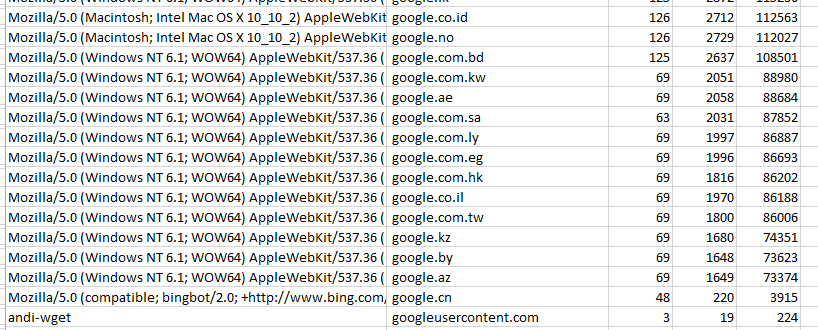
See Baidu in there? Now let's take another look at a few search giants. Google is amazing - that looks like the exact same page with a few lines in various languages. Interesting to see how much code each line contains though, that's huge compared to other sites.


And while the search giants likely have all kinds of fancy (tracking?) elements, some of the search alternatives have a few more lines, but much less actual code on the page. 


Filtering a bit further the confirmation no one likes my 'andi-wget' user agent. Means, future work with wget will need to have a different user agent nearly always!


Check out the first post with result on average responses sizes and how Google responds.

Monday, January 27, 2014

Guest blogging on Moz.com: Good location to get ripples

Last week I checked the company blog of moz.com for ripples, with truly astounding numbers. This week I decided to check on their user generated content - you find it at moz.com/ugc.

First, I pulled all urls from the sitemap moz.com/ugc-sitemap.xml , then again used the ripple script to get the number of ripples = public shares per url. Each url stands for a blog guest post. 

The results are impressive again - user generated content on 1708 posts generates 1251 ripples, with the top posts having 73 and 56 ripples.

The top post "http://moz.com/ugc/google-plus-authorship-one-critical-thing-you-need-to-know" author +Samuel Scott currently is in 222 people's circles on G+ currently, and I doubt there are many other places, if any, where he could have gotten as many shares as here (nor would I or many others, just to be clear).


Again - moz is a great place for seo content, and this narrow focus now on inbound marketing is highly beneficial for readers, for writers, and for the company.
Imagine to add 1251 ripples to YOUR site with guest blogging! 

Tuesday, December 17, 2013

Keyword - check: ranking 100 urls in search engine

Do you ever need to check for a keyword or two which pages rank on Google, and find the results hard to read, and especially cumbersome to copy for further use? At Dell we use large scale tools like seoclarity , and get tons of data in high quality, and I still sometimes have these one-off requests, where I need a small tool, NOW.

It is a small script for linux bash (and thus should run with slight modifications also on cygwin on windows computers).

First I call the script with two parameters - the search engine, then the search term, as in
# . script.sh www.searchengine.com "searchterm" . Search terms with spaces work, just replace the space with a '+'.
That's used to build the url, which then is used with curl to pull the results from Google.  Xidel is a small bash program with super-easy use to use xpath to filter content.

# $1 is query url, $2 is the search term, skipping the check if both are given for shortness
url="http://${1}/search?q=${2}&sourceid=chrome&ie=UTF-8&pws=0&gl=us&num=100"

curl -s -A "Mozilla/5.0 (Windows; U; Windows NT 5.1; de; rv:1.9.2.3) Gecko/20100401 Firefox/3.6.3" -o temp.file "$url" 
xidel temp.file -e "//cite" > urls-from-curlgoogle.csv 
rm temp.file 

Thanks to Benito for Xidel and for helpful input to fix my variable assignment thanks to  +Norbert Varzariu , +Alexander Skwar.

Again, this is not to replace any of the excellent tools out there, free or paid, but to accommodate small tasks, 'quick and dirty' and with some accuracy but not too much handling. And for sure please handle this responsibly, not spamming any search engine and not disregarding any terms of use. I checked when I tried this, and the current ToS seem not to prevent this - but I am no lawyer and might be mistaken. At your own risk.

Monday, August 12, 2013

Clean up WGET results for sitemap

After running the script to get urls per wget, now got to clean them out to get just plain urls. The urls need to be on the right domain / folder and need to have had a 200 OK http respone. So, now there are a bunch of text files with urls in them, but not just urls, but a lot more:

2013-07-16 21:39:00 URL:http://www.dell.com/ [21149] -> "www.dell.com/index.html" [1]
2013-07-16 21:39:00 URL:http://www.dell.com/robots.txt [112] -> "www.dell.com/robots.txt" [1]
2013-07-16 21:39:01 URL: http://www.dell.com/_/rsrc/1373543058000/system/app/css/overlay.css?cb=slate712px150goog-ws-left 200 OK

Now, that's all good to know, but not really usable for building a sitemap. Being used to work and fix a lot of things in excel, that was my first try - but I quickly quit. The only way to come close to cleaning up was changing table to text, and even that did not clean up everything - and took too long, too.

#! bash 
#loop through the files
for i in {1..30}; do
#pull only the lines with a URL, then all that do NOT match my domain 
grep 'URL' wgetlog$i.txt | grep -i 'dell.com' > wget$i.txt
# delete beginning date including url then delete ending part from space on, including file size numbers, then remove spaces, then remove lines not #matching Dell.com
sed -e 's/^[0-9 -:]*URL://g' -e 's/\ \[.*$//g' -e 's/\ //g' -e '/dell\.com/!d' wget$i.txt > support-url-$i.txt
done
Not that pretty, but works fine. I just need to adjust the file name to what I use in the wget script, plus set the number to the number of files used, and then it works just fine. 

This is great for any site using just a couple of thousand pages and a few sitemap updates per year.

Tuesday, July 23, 2013

Google Plus links count as backlinks

There is an ongoing discussion on Social Media and SEO. Currently promoting the synergies of these at Dell, no wonder there are some insights.

One of the common questions is:

Does Social media have an influence on natural search rankings - Answer: Yes

And there are several ways I can 'prove' that. So the question many still ask - correlation or causation, can be answered: Both!

First things first, let me show you one screen which proves the connection. Do you use Google webmaster tools? For SEO folks, that's a standard. And in that tool are backlink reports. As backlinks are considered to have one of the strongest influences on rankings, it is a standard for seo to look at these.

This is how you get there:
On the following page, select 'download latest' links from others to your site.
And then search in the results for plus.google.com as the referring url:


Voila! Clear proof that Google sees these links just as regular backlinks and tracks them in GWT.
Like with many other links, it is not possible to see HOW MUCH influence one link has - and it is not for lack of trying - but I would consider this enough  of a proof that it does count for search engine results page rankings.

Google shows these since roughly a year I would say. Now my hope would be, that Google easily and quickly identifies Google Plus Link spammers and discredits their links, but I doubt they are there already.

As shown in profile - I work for Dell and we have a rather large site with the according number of backlinks from Google Plus and many other sites.

Would you count this as proof that social influences search rankings?

Monday, July 8, 2013

Pull urls from site for sitemap with wGet

Working for a large company we can use a lot of different tools to do our job. One thing I wanted to do is to build a sitemap for a site where the content management system does not provide this feature.

So, I started to check various tools, like screaming frog, sitebuilder. Xenu was not reliable last time I tried, and these two tools did not work as wished for as well, the site is relatively large. And while screaming frog is great and fast, it slows down very much after a few thousand urls.

Using linux at home, I quickly started my first trials with cURL and wget. Curl was ruled out quickly, so focusing on wget I tried a few things.

First, I just started with the root url, and then waited:

wget --spider --recursive --no-verbose --no-parent -t 3 -4 –save-headers --output-file=wgetlog.txt &

spider for only getting the urls, recursive with no-parent for the whole directory but nothing above, -t 3 for three trials to download a url, sending urls to the logfile.
Slowly but surely the list kept building. Added -4 after some research, as is was said to help speed up to force a IPv4 request.

Still very slow, so I tried to run this with xargs:
xxargs -n 1 -P 10 url-list.txt wget --spider --recursive --no-verbose --no-parent -t 2 -4 -save-headers --output-file=wgetlog.txt &

I did not really see an improvement - just plain 'feeling' of time, but it was definitely still to slow to go through 10,000 + urls in a day.

After some research I came up with this solution, and it seems to work well enough:
I split the site into several sections, and then gathered the top ~ 10 urls in a textfile, which I used as input for a loop in a bash script (the # echo I use for testing the scripts, I am a pretty bloody beginner and this helps) :
#! bash
while read -r line; do
#echo $line
wget --spider --recursive --no-verbose --no-parent -t 3 -4 –save-headers --output-file=wgetlog$i.txt $line
#echo wgetlog$i.txt
done < urls.txt
In the wget line the $line stands for the input file into wget, it takes variables. Works well. I get a bunch of wgetlog files with different names with all the urls, and it sure seemed faster than xargs, although I read that xargs is better in distributing load.

Bookmark and Share