Showing posts with label wget. Show all posts

Wednesday, July 22, 2015

Parallel on AWS

Remember the post on how many parallel (simple, wget) processes can be run reasonably on a machine?

This is how it looks on aws / amazon web services EC2:


I added lower / higher numbers after a bit testing, but this is fast - likely because of a really good internet connection. (I might need to try something to test the processing itself without network dependency....)

Many of the scripts - even when run with parallel - still take hours or days to complete. 10,000 or 100,000 urls to check are the rule, sometimes even more. With downloads and processes on the data, this can take a while.

I can't run these from the office, and if I run them from home I keep checking.... which is not that relaxing in time where I want to relax. So, I often use amazon web services EC2.
For about a year I used the free tier - a great offer from Amazon to try the service with a very small instance for free. Now I am in the paid program, but cost is really low for what I do and after a few times it became routine to start a new instance when I need it, run some things, then terminate it.

One of the programs I use pretty much always is tmux - 'terminal multiplexer' - which now is by default on ubuntu instances. It allows not just to run many connected terminals, but also to detach a session. That means, I can start a session, run a script in it, detach and then close the terminal, connection and the script keeps running in the background. A few hours later I can just connect again and download the results.
Especially in combination with parallel this is a great way to run many of the scripts from this blog - and more.

Starting looks a bit like this (thanks to Ole Tange for the tip and the help with parallel):

ls x* | parallel -j24 --line-buffer  " . script.sh {}  >> results.txt "

I often just split large files , then ls or cat the split files to parallel. -j24 is 24 parallel threads, {} picks up the data from ls/cat.

Thursday, July 9, 2015

Crawl faster with "parallel" - but how fast?

Crawling websites - often our own - helps find technical seo, quality and speed issues, you'll see a lot of scripts on this blog in this regard.

With a site with millions of pages, crawling speed is crucial - even a smaller project easily has some thousand urls to crawl. While there are good tools to check for many things, wget and curl in combination with other command line tools give all the flexibility needed - but can be painfully slow.  
To check for download speed for example, a regular script would loop through a list of files, download one, then move to the next. Even split up and running the same script is not great, and quite hard to handle at scale. 

After some search I found gnu parallel - excellent especially for parallel tasks. Running multiple parallel processes is easy and powerful. A switch -j[digit] allows to set a preference for the number of parallel processes. 

But what number is best, especially with networking projects? A wget should not be a heavy computing load, even with some awk/sed/grep afterwards, because most of the time is spent with waiting and data transfer. 

So, a little script to check the time for a few different numbers of parallel processes:

for i in {12,24,36,48,60,80,100}; do var=$( time ( TIMEFORMAT="%R" ; cat "${1}" | parallel "-j${i}" . single-url-check-time-redirect.sh {} ) 2>&1 1>/dev/null ) ; echo "$i parallel threads take $var seconds" ; done

The referenced script (single-url-check-time-redirect.sh) just makes a curl call to check for a http status and a wget for the header transfer time; $1 pulls in a list of full urls.
The results differ greatly by network.

Here a slow, public network in a cafe:


This from a library with a pretty good connection:


And this from a location with a 50MB/sec connection:


Times can vary in  each location by a factor of 2 easily, network connection and load still seem to make the biggest difference as all three were done on the same computer.

Wednesday, June 24, 2015

the script: 8 different user agents and how sites deal with it

User agent analysis script

And mentioned in the earlier post - a script helped me to grab the info on this post on how sites and google specifically treat various browsers.

While there's a lot more to analyse, much of it manually, I wanted to first see if there is an indication of differences - so for first insight I use just a plain wc -l to get characters, words, lines of the response, and it looks like there is a clear pattern. 

So, let's take a look at the source, two nested "read " loops. The outer loop through the urls, the inner loop through the agents:

#check if the file exists
if [[ ! -e $1 ]]; then
 echo -e "there's no file with this name"
fi
outfile=$RANDOM-agentdiff.txt
echo -e "agent \t url \t  bytes \t words \t lines" > $outfile
# add a http to urls that don't have it
while read -r line; do

if [[ $line == http://* ]]; then
newline="$line" else
newline="http://$line"
#  loop through agents. then read output into variables with read "here" <<<
          while read -r agent; do
               read filelines words chars <<< $(wget -O- -t 1 -T 3 --user-agent "$agent" "$newline"  2>&1| wc)
         echo -e "$agent \t $line \t $filelines \t $words \t $chars" >> $outfile
done < $2
fi
done < $1
wc -l $outfile
Most difficult part was to get the wc output into separate variables, thanks stackexchange for the tip with the <<< here string. 

Thursday, April 23, 2015

8 User agents and responses Alexa top million pages

Some more interesting results from the test run with 8 different user agents and the return size of the documents from the top 1000 sites in the Alexa 1million.

These are the largest returns - interesting to see these sites here, newspapers, stores, portals.


Many of the smallest sites are returning nothing, redirecting or under construction, actually quite a lot of the top performing pages.


But... maybe that's just because of the unknown user agent? (or the one with wget in it?)

Yes, very different picture. With just the regular user agents, just few page don't send a page back. Some redirect, but some are just very, very small, great job!

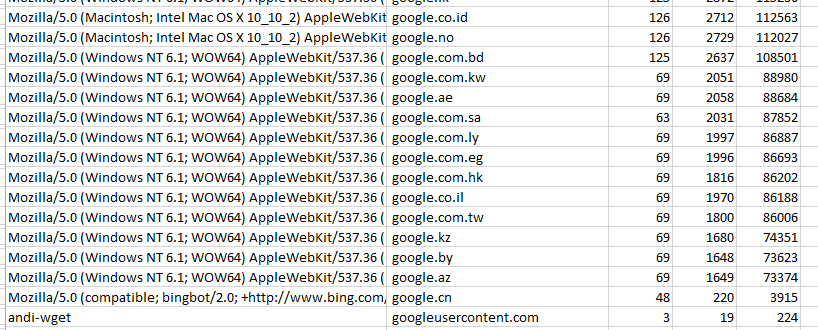
See Baidu in there? Now let's take another look at a few search giants. Google is amazing - that looks like the exact same page with a few lines in various languages. Interesting to see how much code each line contains though, that's huge compared to other sites.


And while the search giants likely have all kinds of fancy (tracking?) elements, some of the search alternatives have a few more lines, but much less actual code on the page. 


Filtering a bit further the confirmation no one likes my 'andi-wget' user agent. Means, future work with wget will need to have a different user agent nearly always!


Check out the first post with result on average responses sizes and how Google responds.

Tuesday, April 7, 2015

Including Google: 8 agents - and average response code


Agents, not spies

Agents, user agents, play an important role in the setup and running of sites, likely more than many developers like. Exceptions, adjustments, fixes - and it is (?) impossible to generate code that shows up properly on all user agents and also is W3C compliant. 

So, sites care, and likely Google cares as well. Google - like any site - offers only one interface to their information (search): source code. How the page looks like, how it is rendered, the tool that renders it is not Google, not provides or supported or maintained or owned by Google, but something on client side. Not even the transport is provided by Google. Google only provides a stream of data via http , https, and anything after that is not their business. 

So, my question was - do user-agents make a difference? 

And sure, what better to use than a little script? There are so many different user agents, I wanted to keep this open to changes, so I loop over a file with user agents - one per line - as well over a list of urls to get the response from these sites.

Surprising results: Bingbot and Googlebot receive the smallest files - not wget or a unknown bot. The graph overstates this, but the table shows there's a clear difference. 


Google.com answering

Now let's take a look at the response Google.com sent back to the little script. They do NOT like wget or andi-bot, nor google bot or bingbot, although they perform a bit better than the first two.
High focus on the regular user agents. The picture for words is the same as for lines.

Google only provides a datastream, rendering is on client side. So if I use firefox, IE, safari, wget or curl is my business - and not Google's.  I understand that google does not want people to scrape large amounts of data off their site - which i don't do - but I am surprised the 'block' is not a bit more sophisticated.


Wednesday, October 29, 2014

Script to check for Opengraph tags, schema and rel publisher


How common are tags like opengraph, schema and rel publisher?

These are interesting, perhaps important features of a website, not just, but also for seo. What better than to take a look at a larger number of sites, and to check if they use these tags.
This is the output of a little script to test for these three tags (schema.org, opengraph.org, rel_publisher for G+ ) on a list of urls.


First generate a unique filename, then copy the header into it. The while loop iterates over a list of urls, and pulls the data into a variable, because the script needs to check for several items, and this avoids to send three requests. I added the timeout parameters to wget, because several domains I tested did not send ANY response when missing the subdomain, and the script hung up.

Next steps are the three filters for og:title, rel publisher and schema (itemtype), into variables, then writing to the line with the url. Done.

#!bash
filename=topresults-$RANDOM.txt
echo -e '\turl\tog:title\trel_publisher\tschema' > ${filename}

while read -r line; do
file=$(wget -qO- -t 1 -T 10 --dns-timeout=10 --connect-timeout=10 --read-timeout=10 "${line}")

title=$(echo "${file}" | grep 'og:title'  | wc -l)
        if (( "$title" > 0 ))
                then title="yes"
        else 
                title="no"
        fi

publisher=$( echo "$file" | grep 'rel="publisher"' | wc -l )
        if (( "$publisher" > 0 ))
                then publisher="yes"
        else 
                publisher="no"
        fi

schema=$( echo "$file" | grep 'itemtype="' | wc -l )
        if (( "$schema" > 0 ))
                then schema="yes"
        else 
                schema="no"
        fi

echo -e "$line\t$title\t$publisher\t$schema" >> ${filename}

done < $1

wc -l $filename


Tuesday, April 8, 2014

Scan site for list of urls - use in sitemap or for other scans

This is the sixth version (some other versions) of this scanner I use - I find it quite practical as it allows me to scan folders easily, come back with good number of urls.

It makes a header request, then stores these in a textfile. Once the scan stops, the script cleans out to only have the 200 responses in a separate file, then filters to only have the url in the final file.
I use a random number for the filename, as I use these in a special folder this allows me to not worry about incompatible characters in the filename, filtering out the basename or duplicate filenames / overwriting files in case I run a scan several times - on purpose or not. I ceep the intermediate textfiles so I can go back and check where something went wrong. Every now and then, I clean up the folder for these files.

#!bash
url="$1"
echo $url
sleep 10

name=$RANDOM

wget --spider -l 10 -r -e robots=on --max-redirect 1  -np "${1}" 2>&1 | grep -e 'http:\/\/' -e 'HTTP request sent' >> "$name"-forsitemap-raw.txt

echo $name

grep -B 1 "200 OK" "$name"-forsitemap-raw.txt > "$name"-forsitemap-200s.txt
grep -v "200 OK" "$name"-forsitemap-200s.txt > "$name"-forsitemap-urls.txt
sed -i "s/^.*http:/http:/" "$name"-forsitemap-urls.txt
sort -u -o"$name"-forsitemap-urls.txt "$name"-forsitemap-urls.txt
cat -n "$name"-forsitemap-urls.txt


Thoughts? Feedback?

Monday, December 23, 2013

Download files on one page with wget - define the type

Something I rarely do - but now I had to: Download a bunch of .ogg files. I am exploring some sound capabilities of my system, and found the system sounds in /usr/share/sounds/.

Naja, not very special - so I started searching in google for 'free sound download filetype;ogg' and similar, and found a few nice sites like www.mediacollege.com.

So, I downloaded 2-3 wavs, and oh, my, that takes time. So, here's my little script:

#!bash
wget -r -l2 --user-agent Mozilla -nd -A.wav "http://www.mediacollege.com/downloads/sound-effects/people/laugh/" -P download
for file in download/*.wav ; do echo "$file" && paplay "$file"; done

Using wget with r for recursive, -nd -P to not rebuild the directory structure (thisis 4 levels down) and then -P download to download into the subfolder download. -A.wav,.ogg only downloads wav and ogg files, and -l1 (one level recursive) for just this page and the files linked from it. Changing this can lead to huge download times and sizes, so careful.

Once done, the last line just echos each filename and then plays it. (paplay for my system, if that does not result in anything perhaps 'aplay' works).


Tuesday, December 17, 2013

Keyword - check: ranking 100 urls in search engine

Do you ever need to check for a keyword or two which pages rank on Google, and find the results hard to read, and especially cumbersome to copy for further use? At Dell we use large scale tools like seoclarity , and get tons of data in high quality, and I still sometimes have these one-off requests, where I need a small tool, NOW.

It is a small script for linux bash (and thus should run with slight modifications also on cygwin on windows computers).

First I call the script with two parameters - the search engine, then the search term, as in
# . script.sh www.searchengine.com "searchterm" . Search terms with spaces work, just replace the space with a '+'.
That's used to build the url, which then is used with curl to pull the results from Google.  Xidel is a small bash program with super-easy use to use xpath to filter content.

# $1 is query url, $2 is the search term, skipping the check if both are given for shortness
url="http://${1}/search?q=${2}&sourceid=chrome&ie=UTF-8&pws=0&gl=us&num=100"

curl -s -A "Mozilla/5.0 (Windows; U; Windows NT 5.1; de; rv:1.9.2.3) Gecko/20100401 Firefox/3.6.3" -o temp.file "$url" 
xidel temp.file -e "//cite" > urls-from-curlgoogle.csv 
rm temp.file 

Thanks to Benito for Xidel and for helpful input to fix my variable assignment thanks to  +Norbert Varzariu , +Alexander Skwar.

Again, this is not to replace any of the excellent tools out there, free or paid, but to accommodate small tasks, 'quick and dirty' and with some accuracy but not too much handling. And for sure please handle this responsibly, not spamming any search engine and not disregarding any terms of use. I checked when I tried this, and the current ToS seem not to prevent this - but I am no lawyer and might be mistaken. At your own risk.

Monday, September 30, 2013

Download urls from sitemap into textfile

Sitemaps again - they are still very helpful, especially for a large site. For several processes the urls are necessary - and going back to the sourcefile is not always possible or practical.

So, here is a small bash script to scan a given sitemap and store the results just the urls into a textfile. Input parameter is the full url of the sitemap. Let's name this sitemap-urls.sh then it would be

# bash sitemap-urls.sh http://www.dell.com/wwwsupport-us-sitemap.xml
#!bash
if [[ ! $1 ]]; then echo 'call script with parameter of url for file'
exit 1
else
wget -qO- "${1}"  | grep "loc" | sed -e 's/^.*loc>//g' -e 's/<\/loc>.*$//g' > sitemap-scan-output.txt
fi
First checking if the file is called with the sitemap url as parameter ($1) and if not, exit with echoing a message. If parameter is set, then download the page without saving it, grep for the right line, and use sed to replace the irrelevant parts, means html tags, with nothing to remove it.

Not fancy, but still good to have. I will use this to check for a few interesting things in next posts, and this is really helpful also if the urls are needed for import in analytics tools and Excel.


Monday, August 12, 2013

Clean up WGET results for sitemap

After running the script to get urls per wget, now got to clean them out to get just plain urls. The urls need to be on the right domain / folder and need to have had a 200 OK http respone. So, now there are a bunch of text files with urls in them, but not just urls, but a lot more:

2013-07-16 21:39:00 URL:http://www.dell.com/ [21149] -> "www.dell.com/index.html" [1]
2013-07-16 21:39:00 URL:http://www.dell.com/robots.txt [112] -> "www.dell.com/robots.txt" [1]
2013-07-16 21:39:01 URL: http://www.dell.com/_/rsrc/1373543058000/system/app/css/overlay.css?cb=slate712px150goog-ws-left 200 OK

Now, that's all good to know, but not really usable for building a sitemap. Being used to work and fix a lot of things in excel, that was my first try - but I quickly quit. The only way to come close to cleaning up was changing table to text, and even that did not clean up everything - and took too long, too.

#! bash 
#loop through the files
for i in {1..30}; do
#pull only the lines with a URL, then all that do NOT match my domain 
grep 'URL' wgetlog$i.txt | grep -i 'dell.com' > wget$i.txt
# delete beginning date including url then delete ending part from space on, including file size numbers, then remove spaces, then remove lines not #matching Dell.com
sed -e 's/^[0-9 -:]*URL://g' -e 's/\ \[.*$//g' -e 's/\ //g' -e '/dell\.com/!d' wget$i.txt > support-url-$i.txt
done
Not that pretty, but works fine. I just need to adjust the file name to what I use in the wget script, plus set the number to the number of files used, and then it works just fine. 

This is great for any site using just a couple of thousand pages and a few sitemap updates per year.

Monday, July 8, 2013

Pull urls from site for sitemap with wGet

Working for a large company we can use a lot of different tools to do our job. One thing I wanted to do is to build a sitemap for a site where the content management system does not provide this feature.

So, I started to check various tools, like screaming frog, sitebuilder. Xenu was not reliable last time I tried, and these two tools did not work as wished for as well, the site is relatively large. And while screaming frog is great and fast, it slows down very much after a few thousand urls.

Using linux at home, I quickly started my first trials with cURL and wget. Curl was ruled out quickly, so focusing on wget I tried a few things.

First, I just started with the root url, and then waited:

wget --spider --recursive --no-verbose --no-parent -t 3 -4 –save-headers --output-file=wgetlog.txt &

spider for only getting the urls, recursive with no-parent for the whole directory but nothing above, -t 3 for three trials to download a url, sending urls to the logfile.
Slowly but surely the list kept building. Added -4 after some research, as is was said to help speed up to force a IPv4 request.

Still very slow, so I tried to run this with xargs:
xxargs -n 1 -P 10 url-list.txt wget --spider --recursive --no-verbose --no-parent -t 2 -4 -save-headers --output-file=wgetlog.txt &

I did not really see an improvement - just plain 'feeling' of time, but it was definitely still to slow to go through 10,000 + urls in a day.

After some research I came up with this solution, and it seems to work well enough:
I split the site into several sections, and then gathered the top ~ 10 urls in a textfile, which I used as input for a loop in a bash script (the # echo I use for testing the scripts, I am a pretty bloody beginner and this helps) :
#! bash
while read -r line; do
#echo $line
wget --spider --recursive --no-verbose --no-parent -t 3 -4 –save-headers --output-file=wgetlog$i.txt $line
#echo wgetlog$i.txt
done < urls.txt
In the wget line the $line stands for the input file into wget, it takes variables. Works well. I get a bunch of wgetlog files with different names with all the urls, and it sure seemed faster than xargs, although I read that xargs is better in distributing load.

Bookmark and Share