Showing posts with label speed. Show all posts

Wednesday, July 22, 2015

Parallel on AWS

Remember the post on how many parallel (simple, wget) processes can be run reasonably on a machine?

This is how it looks on aws / amazon web services EC2:


I added lower / higher numbers after a bit testing, but this is fast - likely because of a really good internet connection. (I might need to try something to test the processing itself without network dependency....)

Many of the scripts - even when run with parallel - still take hours or days to complete. 10,000 or 100,000 urls to check are the rule, sometimes even more. With downloads and processes on the data, this can take a while.

I can't run these from the office, and if I run them from home I keep checking.... which is not that relaxing in time where I want to relax. So, I often use amazon web services EC2.
For about a year I used the free tier - a great offer from Amazon to try the service with a very small instance for free. Now I am in the paid program, but cost is really low for what I do and after a few times it became routine to start a new instance when I need it, run some things, then terminate it.

One of the programs I use pretty much always is tmux - 'terminal multiplexer' - which now is by default on ubuntu instances. It allows not just to run many connected terminals, but also to detach a session. That means, I can start a session, run a script in it, detach and then close the terminal, connection and the script keeps running in the background. A few hours later I can just connect again and download the results.
Especially in combination with parallel this is a great way to run many of the scripts from this blog - and more.

Starting looks a bit like this (thanks to Ole Tange for the tip and the help with parallel):

ls x* | parallel -j24 --line-buffer  " . script.sh {}  >> results.txt "

I often just split large files , then ls or cat the split files to parallel. -j24 is 24 parallel threads, {} picks up the data from ls/cat.

Thursday, July 9, 2015

Crawl faster with "parallel" - but how fast?

Crawling websites - often our own - helps find technical seo, quality and speed issues, you'll see a lot of scripts on this blog in this regard.

With a site with millions of pages, crawling speed is crucial - even a smaller project easily has some thousand urls to crawl. While there are good tools to check for many things, wget and curl in combination with other command line tools give all the flexibility needed - but can be painfully slow.  
To check for download speed for example, a regular script would loop through a list of files, download one, then move to the next. Even split up and running the same script is not great, and quite hard to handle at scale. 

After some search I found gnu parallel - excellent especially for parallel tasks. Running multiple parallel processes is easy and powerful. A switch -j[digit] allows to set a preference for the number of parallel processes. 

But what number is best, especially with networking projects? A wget should not be a heavy computing load, even with some awk/sed/grep afterwards, because most of the time is spent with waiting and data transfer. 

So, a little script to check the time for a few different numbers of parallel processes:

for i in {12,24,36,48,60,80,100}; do var=$( time ( TIMEFORMAT="%R" ; cat "${1}" | parallel "-j${i}" . single-url-check-time-redirect.sh {} ) 2>&1 1>/dev/null ) ; echo "$i parallel threads take $var seconds" ; done

The referenced script (single-url-check-time-redirect.sh) just makes a curl call to check for a http status and a wget for the header transfer time; $1 pulls in a list of full urls.
The results differ greatly by network.

Here a slow, public network in a cafe:


This from a library with a pretty good connection:


And this from a location with a 50MB/sec connection:


Times can vary in  each location by a factor of 2 easily, network connection and load still seem to make the biggest difference as all three were done on the same computer.

Thursday, June 4, 2015

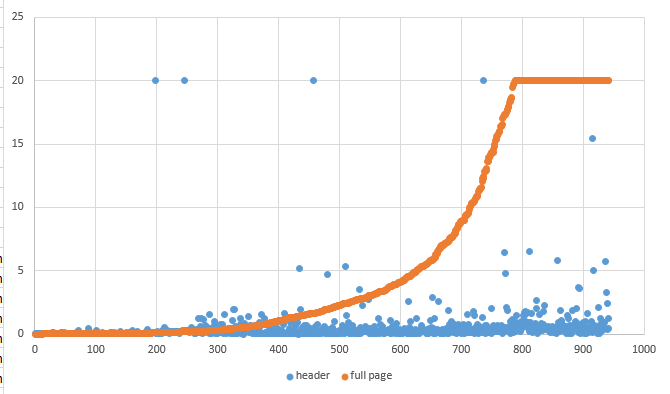
Speed: Data on top 1000 header load time vs full load time

Lots of tools give a different number for the speed of a site, how it is for users, over different channels, providers, including rendering time or not, including many elements or not.

This is the 'hardest' test of all:

  • With a little script I checked the top 1000 pages from the Alexa list*. The first script tests how long it takes to get the http header back (yes, document exists, and yes, I know where it is and it is OK), These are the blue dots.
  • The second script downloads ALL page elements of the homepage, including images, scripts, stylesheets, also from integrated third party tools like enlighten, tealeaf, omniture, or whatever a site uses. These are the orange dots.

First I ran this without time limit, and when I checked back the next day, it was still running, so I set the timeout to 20 seconds.

There seems to be a clear connection between header response time and full time, not so much between rank in the top 1000 by traffic and speed.

sorted by full download time


sorted by traffic rank

There also seems to NOT be a clear connection on how rank by traffic (x-axis) correlates to full download time. This shows that we have a great opportunity to outperform many other companies with faster download speeds.


* Alexa (owned by Amazon) publishes the top 1 Million websites by traffic, globally, based on data from  many different browser plugins plus from Amazon (cloud?) services.

Thursday, January 22, 2015

Alexa 1 million Top mobile performers on Google sitespeed score: perfect score 100


Mobile SpeedScore

Similar to the desktop numbers here are the top performers on mobile with a speedscore of 100 (out of the top 10,000 from Alexa's top million sites!
Checked with this script, and then just a graph in Excel to show the distribution of 100-score by 1000s. While there seems to be a strong correlation between being in the top 1000 and sitespeed, sites with a speedscore of 100 appear more frequent in other areas, highest in the sites which rank in the 8000s in Alexa.


Sitelist mobile Speed Score

No Google search, interestingly, and many other big names missing, but a list of urls I am not even going to try to check the content through our company network. Bold shows sites, that have a speedscore of 100 in desktop and mobile:

position in Alexa top 10,000 site url speedscore
29 googleusercontent.com 100
122 secureserver.net 100
571 github.io 100
776 streamcloud.eu 100
1051 gstatic.com 100
1197 atpanel.com 100
1497 sourtimes.org 100
1537 openadserving.com 100
1576 googleadservices.com 100
1636 googleapis.com 100
1969 securepaynet.net 100
2153 anitube.se 100
2281 nocookie.net 100
2616 socialspark.com 100
2665 bookryanair.com 100
2696 onlinecreditcenter6.com 100
2729 gudvin.tv 100
2896 giaoduc.net.vn 100
2935 sexad.net 100
2981 9gag.tv 100
3179 withgoogle.com 100
3343 readserver.net 100
3455 ecplaza.net 100
3491 dilandau.eu 100
3606 prcm.jp 100
3659 themeko.org 100
3802 puu.sh 100
4047 get-a-fuck-tonight.com 100
4181 kienthuc.net.vn 100
4194 stream-tv.me 100
4340 api.ning.com 100
4355 benesse.ne.jp 100
4571 itrack.it 100
4606 trackoptimizer.com 100
4743 7xz3.com 100
4965 uast.ac.ir 100
4982 edgesuite.net 100
5013 liveadexchanger.com 100
5318 ipsosinteractive.com 100
5349 fun698.com 100
5433 moudamepo.com 100
6304 reduxmediia.com 100
6605 teknosa.com.tr 100
6711 tradetang.com 100
6714 vgsgaming.com 100
6804 yieldtraffic.com 100
6808 insight.ly 100
7009 contest-winners.com 100
7070 exhentai.org 100
7116 techhelpfox.com 100
7285 mlstatic.com 100
7736 mmstat.com 100
7772 lovethatsex.com 100
8038 endlessmatches.com 100
8040 savedwebhistory.org 100
8160 flirt-fuck.com 100
8213 h12-media.net 100
8298 kataskopoi.com 100
8414 ihct.mx 100
8601 evsuite.com 100
8630 rapmls.com 100
8735 9stock.com 100
8921 credomatic.com 100
8991 fullsail.edu 100
9097 youtu.be 100
9236 cncmax.cn 100
9335 gefaellt-mir.me 100
9345 vtb24.ru 100
9348 xe2c.com 100
9360 tehran.ir 100
9745 jobspapa.com 100
9792 iphone-winners.net 100
9898 nolix.ru 100
9907 mihanstore.net 100

Wednesday, January 14, 2015

Alexa 1 million Top desktop performers on Google sitespeed score: perfect score 100

Desktop sitespeed score

Using the good old (or new) Alexa top 1M sites list again, this is the list of the top performers on desktop with a speedscore of 100! Checked with this script, and then just a graph in Excel to show the distribution of 100-score by 1000s. While there seems to be a strong correlation between being in the top 1000 and sitespeed, sites with a speedscore of 100 appear more frequent in other areas, highest in the sites which rank in the 8000s in Alexa.

No. of sites with homepage speedscore 100 = perfect for desktop per 1000 sites from Alexa


Sitespeed score 100 site list

No Google search, interestingly, and many other big names missing, but a list of urls I am not even going to try to check the content through our company network.

No. in Alexa 1 million Site URL score
29  googleusercontent.com  100
122  secureserver.net  100
571  github.io  100
776  streamcloud.eu  100
1027  lapatilla.com  100
1051  gstatic.com  100
1197  atpanel.com  100
1497  sourtimes.org  100
1537  openadserving.com  100
1576  googleadservices.com  100
1636  googleapis.com  100
1969  securepaynet.net  100
1995  banesconline.com  100
2281  nocookie.net  100
2696  onlinecreditcenter6.com  100
2896  giaoduc.net.vn  100
2935  sexad.net  100
2981  9gag.tv  100
3179  withgoogle.com  100
3343  readserver.net  100
3347  xxxhost.me  100
3491  dilandau.eu  100
3606  prcm.jp  100
3802  puu.sh  100
4031  womenwan.com  100
4047  get-a-fuck-tonight.com  100
4181  kienthuc.net.vn  100
4194  stream-tv.me  100
4274  tradeindia.com  100
4355  benesse.ne.jp  100
4571  itrack.it  100
4606  trackoptimizer.com  100
4743  7xz3.com  100
4982  edgesuite.net  100
5013  liveadexchanger.com  100
5318  ipsosinteractive.com  100
5349  fun698.com  100
5433  moudamepo.com  100
5732  come.in  100
6304  reduxmediia.com  100
6714  vgsgaming.com  100
6804  yieldtraffic.com  100
6808  insight.ly  100
6964  adxhosting.net  100
7009  contest-winners.com  100
7070  exhentai.org  100
7116  techhelpfox.com  100
7285  mlstatic.com  100
7337  fzg360.com  100
7382  siyahgazete.com  100
7484  imgsin.com  100
7736  mmstat.com  100
7762  cnnewmusic.com  100
7962  picketfenceblogs.com  100
8038  endlessmatches.com  100
8040  savedwebhistory.org  100
8160  flirt-fuck.com  100
8213  h12-media.net  100
8298  kataskopoi.com  100
8414  ihct.mx  100
8601  evsuite.com  100
8630  rapmls.com  100
8735  9stock.com  100
8890  travideos.com  100
8921  credomatic.com  100
9097  youtu.be  100
9236  cncmax.cn  100
9335  gefaellt-mir.me  100
9348  xe2c.com  100
9745  jobspapa.com  100
9792  iphone-winners.net  100
9898  nolix.ru  100
9907  mihanstore.net  100

Tuesday, December 30, 2014

Logfile analysis for SEO: visualization of bot visits

The bot visits are filtered out of logfiles and sorted / counted as shown here. This here now filters for certain bots (out of the hundreds visiting the site) and makes a small graph out of it.

This is the resulting table - easy to adjust to the bots of interest based on earlier research. (These are not real numbers, but just fillers to show how it looks like). 


This is the visualization in excel of the table with real numbers. Yandex is not in here, because they had so many visits that they dwarfed all the other bots counters. Each color stands for a different bot.


This is the filter to get the table - which can be easily adapted to show more / less or different search engine crawler data:
echo -e 'google\tbing\tyandex\tbaidu\tapple\tlinux\ttrident' > bots-table.txt
for i in $(ls | grep "[[:digit:]]-[[:digit:]]"); do
google=$( cat $i/bots-traffic.txt | awk 'BEGIN { FS = " " } $13~/oogle/ { print $ 13 } ' | wc -l ) ;
bing=$( cat $i/bots-traffic.txt | awk 'BEGIN { FS = " " } $13~/bing/ { print $ 13 } ' | wc -l ) ;
yandex=$(cat $i/bots-traffic.txt | awk 'BEGIN { FS = " " } $13~/yandex/ { print $ 13 } ' | wc -l ) ;
baidu=$(cat $i/bots-traffic.txt | awk 'BEGIN { FS = " " } $13~/baidu/ { print $ 13 } ' | wc -l ) ;
apple=$(cat $i/bots-traffic.txt | awk 'BEGIN { FS = " " } $13~/Apple/ { print $ 13 } ' | wc -l ) ;
linux=$( cat $i/bots-traffic.txt | awk 'BEGIN { FS = " " } $13~/Linux/ { print $ 13 } ' | wc -l ) ;
trident=$(cat $i/bots-traffic.txt | awk 'BEGIN { FS = " " } $13~/Trident/ { print $ 13 } ' | wc -l ) ;
echo -e "$i\t$google\t$bing\t$yandex\t$baidu\t$apple\t$linux\t$trident" >> bots-table.txt
done

Old version - with 'wrong' results, needed to show date from folder to make sure they are aligned

echo -e 'google\tbing\tyandex\tbaidu\tapple\tlinux\ttrident' > bots-table.txt
google=$(for i in $(ls | grep "[[:digit:]]-[[:digit:]]"); do cat $i/bots-traffic.txt | awk 'BEGIN { FS = " " } $13~/oogle/ { print $ 13 } ' | wc -l ; done)
bing=$(for i in $(ls | grep "[[:digit:]]-[[:digit:]]"); do cat $i/bots-traffic.txt | awk 'BEGIN { FS = " " } $13~/bing/ { print $ 13 } ' | wc -l ; done)
yandex=$(for i in $(ls | grep "[[:digit:]]-[[:digit:]]"); do cat $i/bots-traffic.txt | awk 'BEGIN { FS = " " } $13~/yandex/ { print $ 13 } ' | wc -l ; done)
baidu=$(for i in $(ls | grep "[[:digit:]]-[[:digit:]]"); do cat $i/bots-traffic.txt | awk 'BEGIN { FS = " " } $13~/baidu/ { print $ 13 } ' | wc -l ; done)
apple=$(for i in $(ls | grep "[[:digit:]]-[[:digit:]]"); do cat $i/bots-traffic.txt | awk 'BEGIN { FS = " " } $13~/Apple/ { print $ 13 } ' | wc -l ; done)
linux=$(for i in $(ls | grep "[[:digit:]]-[[:digit:]]"); do cat $i/bots-traffic.txt | awk 'BEGIN { FS = " " } $13~/Linux/ { print $ 13 } ' | wc -l ; done)
trident=$(for i in $(ls | grep "[[:digit:]]-[[:digit:]]"); do cat $i/bots-traffic.txt | awk 'BEGIN { FS = " " } $13~/Trident/ { print $ 13 } ' | wc -l ; done)
paste <(echo "$google") <(echo "$bing") <( echo "$yandex") <(echo "$baidu")  <(echo "$apple")  <(echo "$linux") <(echo "$trident") >> bots-table.txt


Thursday, December 18, 2014

Google sitespeed score - script to tap api and Alexa top 10,000


Pagespeed - Score

Even if it would not be relevant for large site indexation, it still has huge impact on traffic, bounce rate and CE. Google offers a great tool to get their feedback - the sitespeed score. It does not show the actual speed, but how your page is build compared to an page ideally built for speed. So it shows the potential to improve.

As input I use the top 10,000 from the Alexa top million pages - using the homepage, only. (I actually split it in 10, ran the script 10x in parallel). The process is relatively slow, as Google checks the pages, and give much more details back than just the score - which I filter out, below. Just fill in your api key (after the = sign) and feed your sitemap (just urls) to the script. Below is for mobile sitespeed, for desktop just swap mobile with desktop. The allowance currently is 25 k api calls a day for free, that's plenty for most sites or projects.

Mobile sitespeed score scatterplot of Alexa top 10,000 sites homepages

Then I just cleaned it out, set all garbage values to zero, and build a scatterplot.
  • Few sites at 100 sitespeed score
  • a relatively sparsely populated area between 80 and 100 
  • the bulk of sites between 40 and 80
  • scores 40 and lower being less frequent as well.


Speedtest score script:

And this is the script:
filename=mobile-speedtest-$RANDOM.txt
echo -e 'url\tspeed-score' > ${filename}
IFS="," ; while read -r counter line; do
score=$(curl -s  -m 30 -f --retry 1 --proto =https --proto-redir =https "https://www.googleapis.com/pagespeedonline/v1/runPagespeed?url=http://www.${line}&strategy=mobile&key=--- your api key ---" | sed -n '/score[^,]*,/p'| sed -e 's/\"//g' -e 's/,//g' -e 's/score: //g' )
echo -e "$counter \t $line \t $score" >> ${filename}
done < $1

Bookmark and Share